
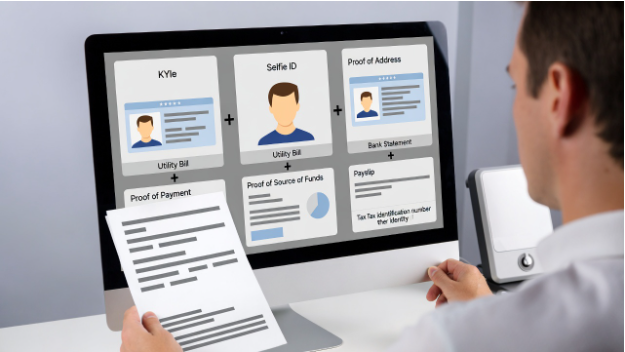
To beat KYC delays, upload a complete, readable set of six documents on your first submission: a government photo ID (front/back), a selfie that matches the ID, proof of address, proof of payment method/ownership (when relevant), source-of-funds evidence (when thresholds trigger it), and any required tax/identity number document for your jurisdiction. Most “KYC taking forever” cases aren’t queue time—they’re rework caused by mismatched names/addresses, expired IDs, cropped images, unreadable files, or missing context (like who owns the card or where the funds came from).
Why KYC drags: the real reasons insiders see
KYC checks are usually broken into three lanes that can stall independently:
- Identity verification (are you a real person, does the document look authentic, does the selfie match?)
- Address verification (does your residency match what you declared, and is the document acceptable and recent?)
- Risk and payments (does your deposit/withdraw method belong to you, and do your transactions trigger enhanced due diligence?)
Delays happen when your upload can’t be processed quickly by the vendor’s OCR/automation, forcing manual review. The fastest path is making your documents machine-readable and internally consistent: same legal name spelling, same date formats, same address line, and clear visibility of all required fields.
The 6 documents to prepare (and how to upload each correctly)
1) Government-issued photo ID (front and back)
What works best: passport (often fastest), then national ID, then driver’s license (varies by country).
Common first-try failure points
- Uploading only the front when the back contains the MRZ/barcode or issue data.
- Glare over the face or holograms that obscures numbers.
- Cropped corners; reviewers need to see full document edges to spot tampering.
- Expired document or document too close to expiry (some operators require 30–90 days validity remaining).
Pro upload method
- Use a dark, matte background; place the ID flat.
- Take two separate images (front, back), not one collage.
- Ensure sharp focus on the ID number and expiry date.
- Avoid “enhancements” like filters; they can trigger forgery flags.
2) Selfie / liveness photo that matches the ID
Some flows use live video; others accept a still selfie. Either way, the goal is to prove the person holding the account matches the ID.
Common failure points
- Selfie taken in low light; facial landmarks can’t be compared.
- Wearing glasses or hats when your ID photo doesn’t (or vice versa).
- ID held too close, covering the face, or too far, making text unreadable.
- Using a camera that smooths skin or applies HDR artifacts.
Pro upload method
- Bright, indirect light (facing a window is ideal).
- Neutral expression; keep both eyes visible.
- If asked to hold the ID, keep the ID beside your face (not under your chin) and ensure the ID photo and your face are both in focus.
- If asked for a handwritten note, write exactly what they request (date + platform name + “for verification”), legible, no abbreviations.
3) Proof of address (POA) document
POA is where most rejections cluster because “address” is surprisingly hard to standardize.
What typically passes
- Utility bill (electric, water, gas)
- Bank/credit card statement
- Government letter (tax, residency, benefits)
- Tenancy agreement (sometimes accepted, often requires additional support)
The hidden gotchas
- Recency: many systems require issued within 90 days (some 30 days).
- Formatting: PO boxes often fail if a residential address is required.
- Name match: initials or nicknames can fail if not identical to the account name.
- Address line mismatch: “Apt 4B” vs “Unit 4B” can be enough to trigger manual review.
Pro upload method
- Upload the full multi-page statement if the address is on page 2 (don’t cherry-pick a screenshot).
- If your address includes diacritics or local characters, keep them consistent across your profile and POA; don’t “simplify” spelling on one side.
- If you’ve recently moved, update your account address first, then upload POA that matches it exactly.
4) Proof of payment method / ownership (when deposits or withdrawals require it)
If you used card, bank transfer, or certain e-wallets, operators may need to confirm you control that method to prevent third-party funding and chargeback risk.
What’s usually requested
- Card: photo showing last 4 digits and name; CVV must be hidden.
- Bank: statement showing account holder name and IBAN/account number.
- E-wallet: screenshot of profile page showing your name and wallet ID/email.
Common failure points
- Showing too much (full card number) triggers security rejection.
- Showing too little (no name or no last 4 digits) triggers ownership rejection.
- Screenshot doesn’t show the URL/app header; looks edited.
Pro upload method
- For cards, cover middle digits and CVV with a physical sticky note (not digital blur), leave first 6 and last 4 visible only if requested; otherwise last 4 is usually sufficient.
- For e-wallet screenshots, include the app header and a recent transaction line that ties the wallet to your activity (amount/date), if allowed.
5) Source of funds (SOF) evidence (when thresholds or patterns trigger it)
Many users are surprised by SOF requests, but they’re standard once withdrawals, deposit volume, or risk flags hit a threshold. The goal isn’t to judge your job—it’s to show funds are legitimate and coherent with activity.
Examples that typically satisfy SOF
- Payslips (last 2–3) plus bank credits showing salary deposits
- Tax return or annual income statement
- Business accounts and invoices (for self-employed)
- Investment account statement for liquidation/withdrawals
- Sale of asset (contract + bank credit)
- Inheritance documentation (letter + bank credit)
Common failure points
- Uploading a payslip with no matching bank deposit.
- Uploading a bank statement with credits but no explanation of origin.
- Redacting key fields (name/date/amount) so heavily it becomes unusable.
Pro upload method
- Create a simple “paper trail bundle”: one document showing origin (payslip/contract), one showing receipt (bank statement line), and, if needed, one showing transfer into your gambling wallet method.
- Use a PDF with bookmarks or clear filenames: “SOF1PayslipNov.pdf”, “SOF2BankCreditsOct-Dec.pdf”.
6) Tax/identity number document (jurisdiction-dependent)
Some regions require a national ID number, tax number, or social security equivalent for compliance reporting. Others only require it when you cross certain withdrawal limits.
Common failure points
- Submitting the wrong document type (e.g., an employment card instead of a tax certificate).
- Mismatch between number formatting and profile (spaces, leading zeros).
- Document not showing your full name alongside the number.
Pro upload method
- Use the official letter/card that shows both your legal name and the number.
- If the system asks you to enter the number manually, copy it exactly as displayed (including leading zeros), then ensure the uploaded document shows the same format.
File quality, naming, and metadata: what speeds up manual review
Even when automation fails, reviewers move faster when your submission is clean.
- Resolution: aim for 1500–2500 px on the long edge for photos. Too low blurs microprint; too high can exceed upload limits.
- Formats: PDF for statements/letters; JPG/PNG for photos. Avoid HEIC unless explicitly supported.
- Cropping: include full page edges; cropping triggers tamper suspicion.
- Lighting: avoid flash glare on IDs; use angled light.
- Compression: messaging apps often compress images—upload the original file, not a forwarded copy.
- Filenames: replace “IMG4829.jpg” with “IDFront.jpg”, “POABankStatementDec2025.pdf”. Reviewers see these names.
A practical trick: open the file on a different device before uploading. If you can’t read the smallest text instantly, the verifier probably can’t either.
Case study: reducing rework by aligning identity data with transaction context
When KYC slows down, it’s usually because compliance is trying to reconcile identity with gambling activity and payments—especially when crypto is involved. The approach on CasinoWhizz BTC casinos guide to displaying odds and game information side-by-side with payment context illustrates the broader point: reviewers (and risk systems) work faster when key details are presented together and consistently. Translating that into your KYC upload means pairing documents that answer the same question in one pass—for example, submitting a bank statement page that shows your name and the incoming salary credit alongside payslips, instead of sending them days apart. The less back-and-forth required to connect “who you are” with “where the funds came from” and “which method you control,” the fewer manual touches your case needs.
What to do if you still get rejected (without starting over)
Rejections often come with a vague reason code. Treat it like debugging:
- “Document not readable”: re-shoot with better light; increase resolution; avoid glare; upload original.
- “Document incomplete”: add missing page(s), back side, or full statement range.
- “Name/address mismatch”: update profile fields to match the document exactly, then re-upload.
- “Unsupported document”: switch to a utility bill or bank statement; avoid screenshots of PDFs unless accepted.
- “Need additional information”: respond with a bundled set (origin + receipt + method ownership), not a single extra page.
If support allows notes, include one sentence that maps documents to requirements: “POA is page 1; salary credits are highlighted on page 3; card ownership shows last 4 digits.”
Key Takeaways
- Upload six items first try: photo ID (front/back), selfie/liveness, proof of address, proof of payment method, source of funds (if triggered), and any required tax/identity-number document.
- Most delays come from rework: mismatched profile data, cropped/unclear images, missing pages, or no document trail tying funds to you.
- Make uploads machine- and reviewer-friendly: full edges visible, high readability, original files, and filenames that state what each file proves.
- When asked for more info, respond with a coherent bundle (origin + bank receipt + payment-method ownership) to eliminate follow-up cycles.